Website advertising marketplace

How Vybridge works

Advertisers find places to advertise on real websites.

Website owners turn available space into advertising inventory.

Vybridge connects both sides and manages the booking workflow.

See how it works ↓

Why Vybridge is useful

For advertisers

Find advertising space without emailing website owners one by one.

  • Browse real websites
  • See available placements
  • Choose dates and eligible countries
  • Book at Fixed Price or submit Your Offer

For website owners

Turn website space into advertising inventory you can sell.

  • Control placement and pricing mode
  • Receive bookings and offers in one place
  • Keep control of your website

For referrers

Invite new websites to Vybridge and earn referral rewards.

  • Help websites discover a new revenue channel
  • Earn under existing website referral rules

Start here

The whole marketplace in one picture

Vybridge is a booking system for advertising space on real websites — like booking a room, but for an ad placement.

Advertiser flow

Advertiser Finds website Chooses placement Dates + countries Books / offer Pays Ad runs

Website owner flow

Website owner Adds website Creates placement Fixed Price / Your Offer Booking / offer Ad runs Earns

For advertisers

How to buy website advertising

Browse without an account. Sign in only when you are ready to book or submit an offer.
Discover

Find a website and choose a placement

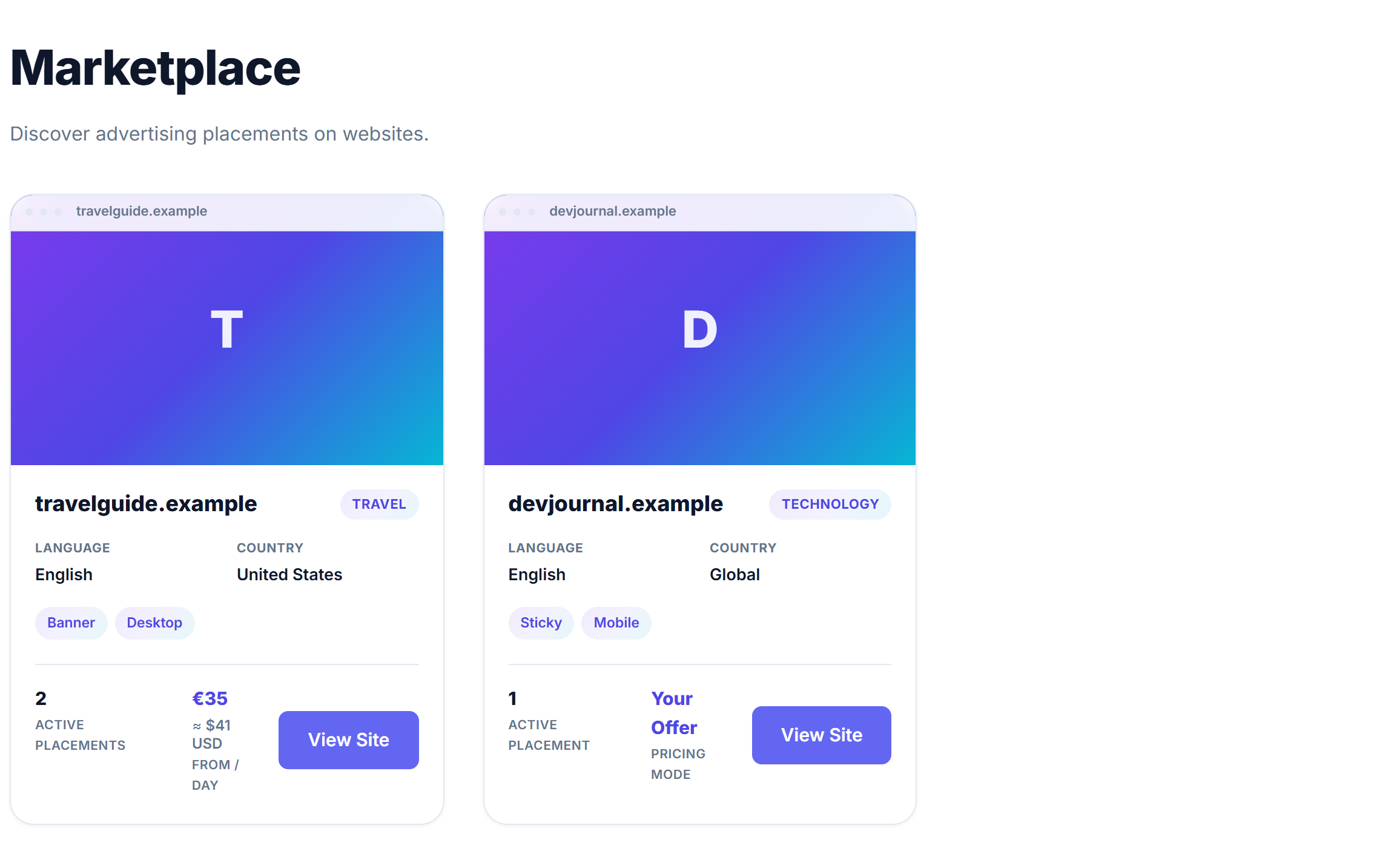
  1. Find a website Open the Marketplace and browse websites with available advertising placements.
  2. Choose the placement A placement is a specific ad space on a page — banner, sticky area, or another format the publisher created. Open the listing to see size guidance, rules, and booking options.
Vybridge Marketplace listing website cards with available advertising placements.

What you are looking at: The Marketplace catalog of websites with advertising placements.

What to do here: Browse websites and open one that fits your campaign.
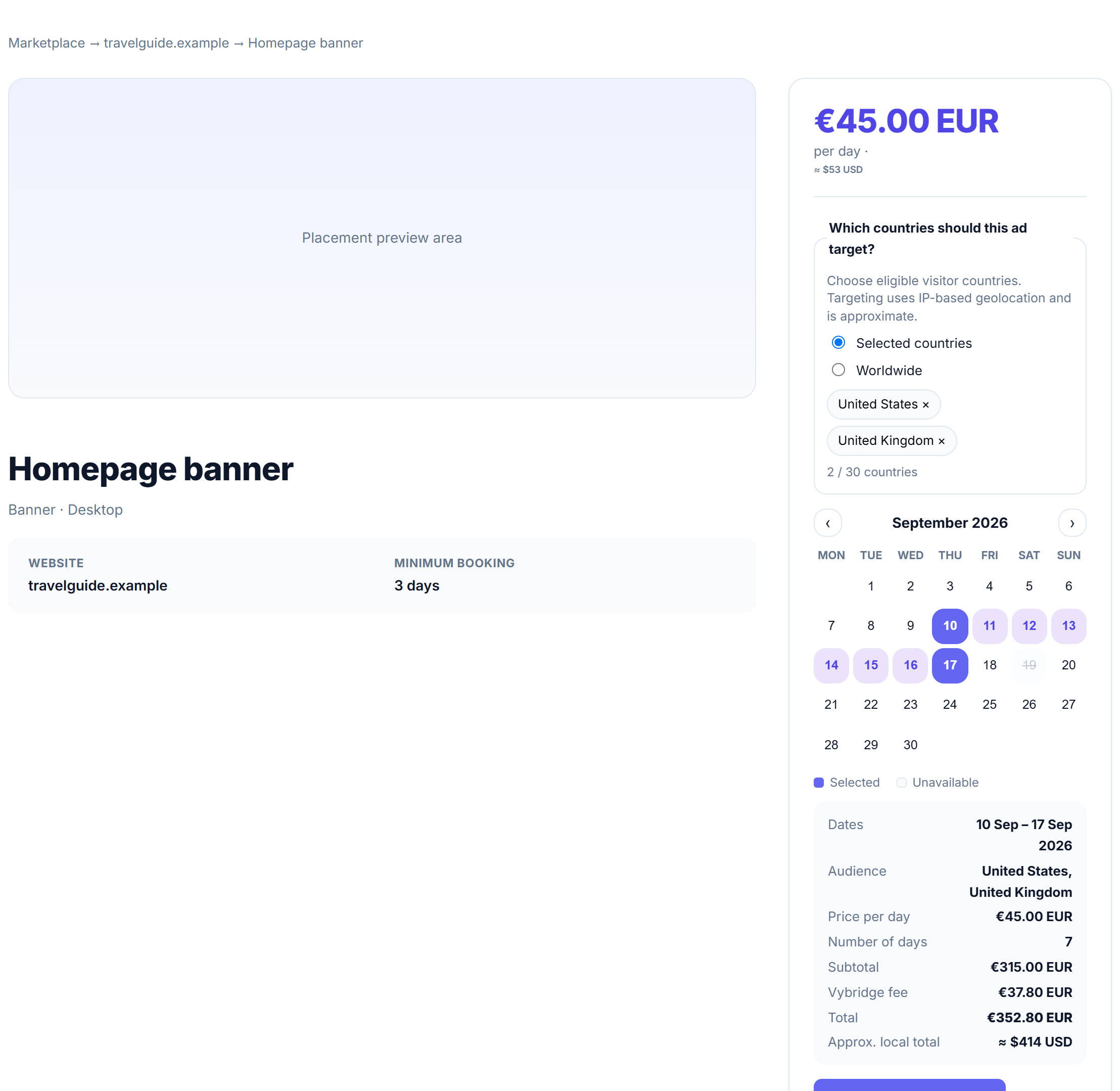
A listing page showing an advertising placement and booking panel.

What you are looking at: A listing with placement details and the booking panel.

What to do here: Review the placement, then configure dates and targeting.
Configure

Choose when and where the ad should appear

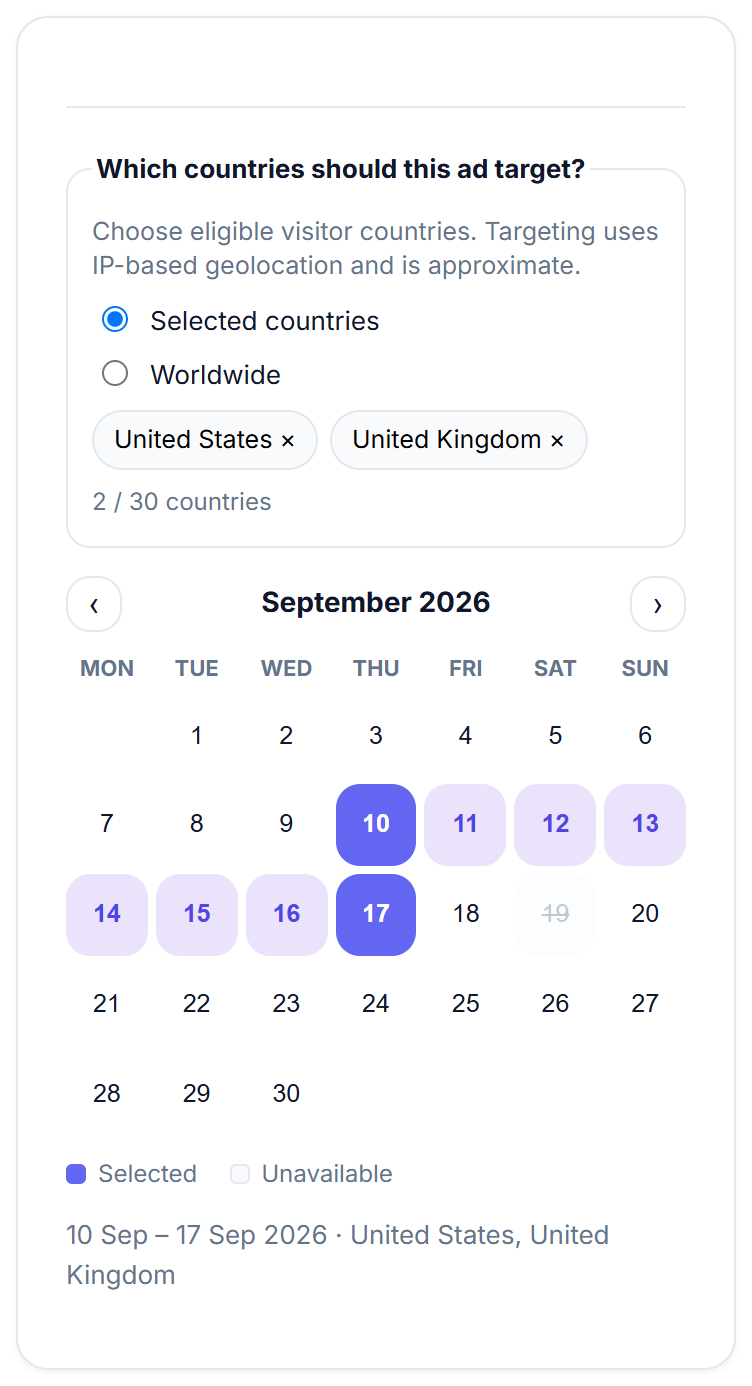
  1. Choose dates Use the calendar to pick when the ad should run. Unavailable dates are blocked so you do not book space that is already taken.
  2. Choose audience geography Target worldwide visitors or selected countries. Country matching uses approximate IP-based geolocation — useful, but not perfect.
Booking calendar with selected dates and country targeting chips.

What you are looking at: Country targeting and a date calendar on a listing.

What to do here: Select your run dates and the countries where the ad should be eligible.
Book

Set your price path, sign in, and pay

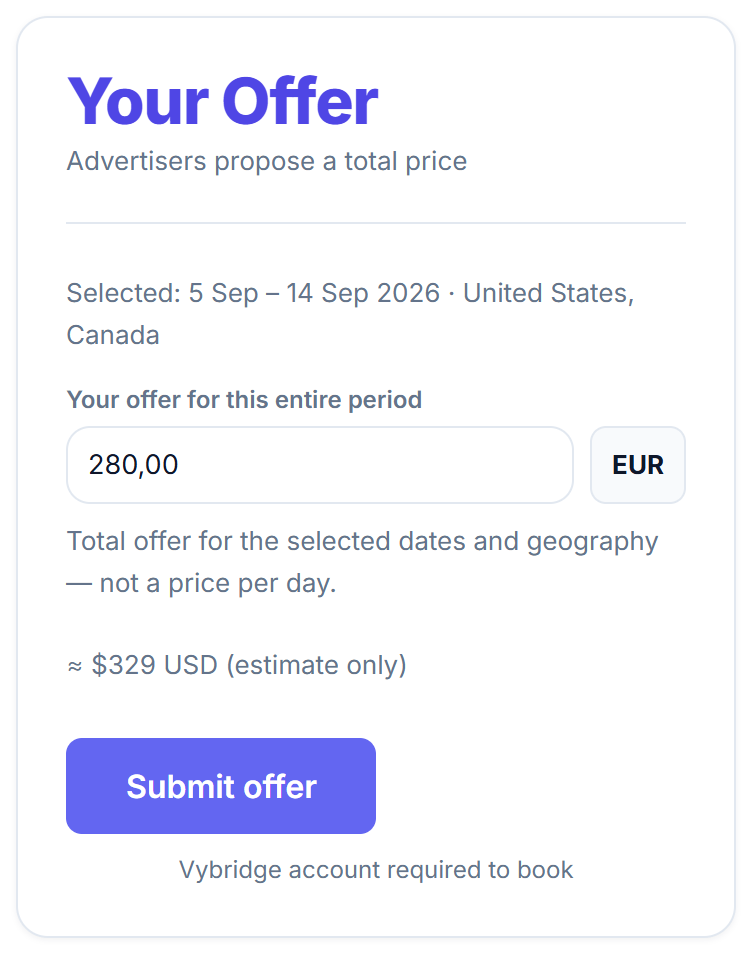
  1. Fixed Price or Your Offer On Fixed Price listings, the publisher already set the price — you see the total before paying. On Your Offer listings, you enter a total offer for the whole selected period and geography — not a price per day. Pending offers do not reserve inventory.
  2. Create an account when you are ready Configure dates, countries, and offer amount without signing in. When you click Book or Submit offer, Vybridge asks you to log in or register. Your selections are saved while you authenticate, then you return to review and continue.
  3. Pay securely You pay through Stripe Checkout in EUR — the advertising amount plus the platform fee shown before checkout.
Your Offer input showing a total offer amount in EUR for the selected period.

What you are looking at: A Your Offer input for a total period price.

What to do here: Enter your total offer, then submit for publisher review.
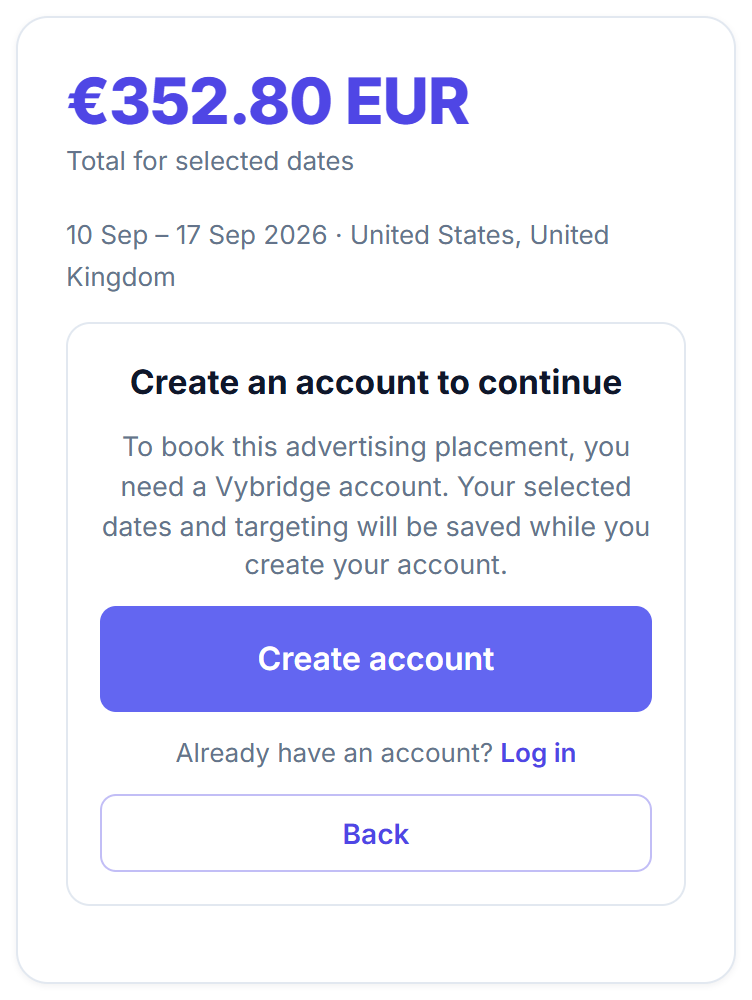
Create an account to continue gate with saved booking selections.

What you are looking at: A prompt to create an account before booking.

What to do here: Register or log in — your dates and targeting stay saved.

Why an account? Booking and offers are commercial actions. An account keeps your work and payments connected to you.

Run

Your ad goes live and is measured

  1. Creative review & serving Your ad goes live when everything is ready. After payment and approval, Vybridge checks that the placement, dates, and targeting are ready before the ad starts showing.
  2. Measurement Vybridge records basic serving accountability for eligible bookings — for example whether an impression or click occurred. This supports the booking workflow; it is not a full campaign analytics product. Vybridge does not guarantee clicks, sales, reach, or audience size.

For website owners

How to sell advertising on your website

Turn unused website space into bookable inventory — while keeping control of placement and pricing.

Get started

Account, website, and payout setup

  1. Create a Vybridge account — sign up as a publisher and accept the Terms and Privacy.
  2. Add your website — register the site you want to monetize.
  3. Complete payout setup Before your advertising placement can accept bookings, complete payout setup so Vybridge knows where eligible earnings can be sent.

Why payout setup? Commercial inventory stays unbookable until payout readiness is satisfied. That protects advertisers and publishers.
Set up

Install Vybridge and create placements

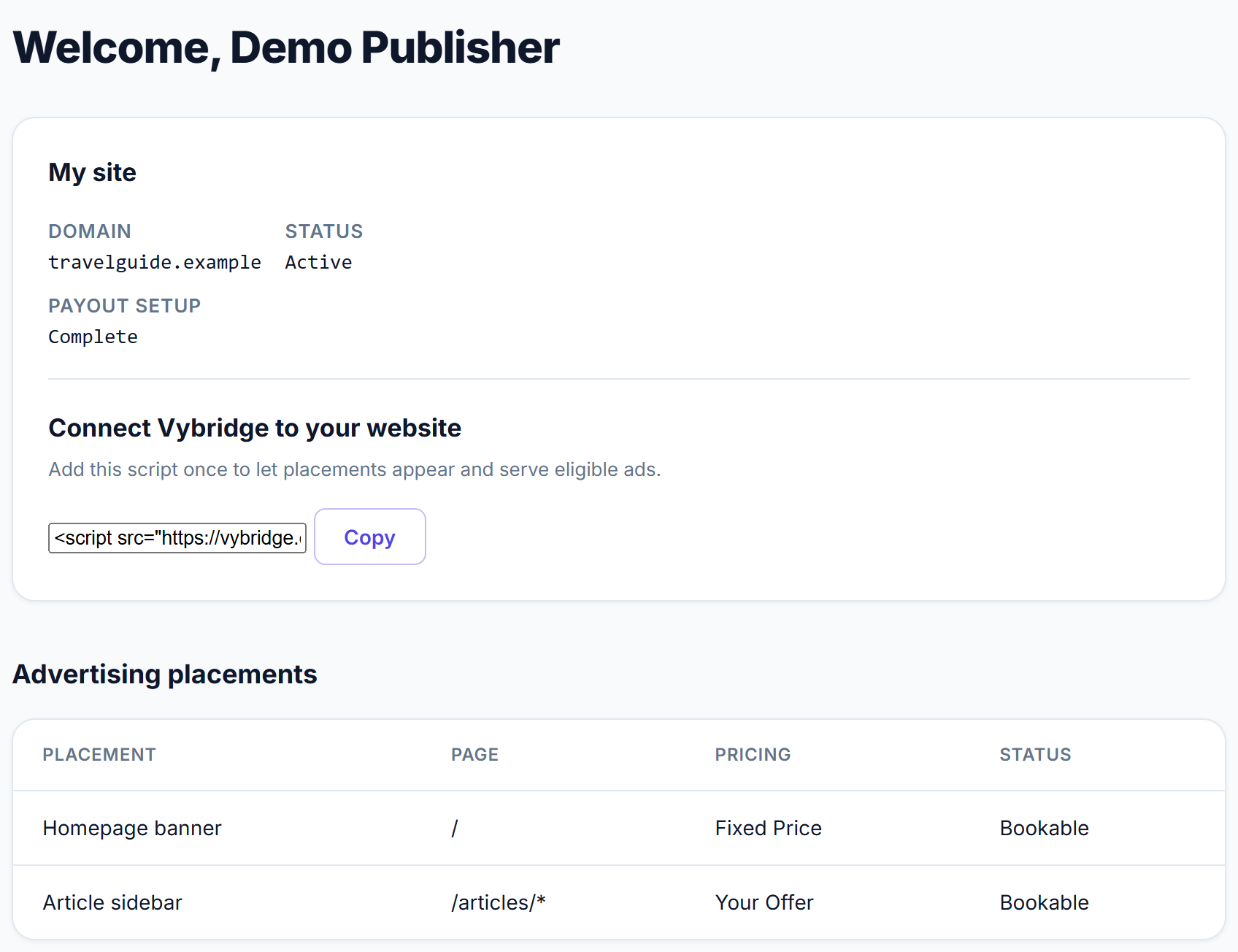
  1. Install Vybridge on your site Add the Vybridge script once. It lets placements appear on the pages you choose and later serve eligible booked ads.
  2. Create an advertising placement Choose the page, position, format, and device rules for the slot.
  3. Choose pricing mode Pick Fixed Price (you set the price) or Your Offer (advertisers propose a total). Prices are currently set in EUR.
Publisher dashboard showing site details, script install snippet, and advertising placements.

What you are looking at: Your dashboard, script install, and placement list.

What to do here: Add your site, install the script, and create your first advertising placement.

Learn more: technical setup

Publishers install Vybridge’s website script from the dashboard. Placement tools help you choose where ads appear on a page. Serving happens only when a booking is eligible — installing the script alone does not mean paid ads are live.

Earn

Receive bookings and get paid

  1. Receive bookings or offers Fixed Price: advertisers book available dates at your price. Your Offer: review each total offer and accept or reject. Pending offers do not occupy dates until accepted.
  2. Review creatives & let eligible ads serve Review each ad before it is eligible to serve. Serving starts only when payment, creative, inventory, targeting, and serving requirements are met.
  3. Earnings Earnings become eligible for payout after the advertising placement has started correctly and the booking meets Vybridge payout requirements.

Refunds, disputes, compliance checks, or payout-account issues can delay a payout. Settlement is not paid merely because a placement has ended.

Pricing

Fixed Price vs Your Offer

Two clear ways to price a placement. One listing uses one mode.

Fixed Price

You choose the price. Advertisers know the cost immediately.

  • Publisher sets the daily or duration price rules
  • Advertiser selects dates + geography
  • Quote shows placement amount + platform fee + total
  • Normal booking path after account and payment

Example: “€40 EUR / day for 7 days” → subtotal for those days, then the platform fee is added on top.

Your Offer

Advertisers tell you what they are willing to pay in total.

  • Publisher does not publish a fixed advertising price
  • Advertiser chooses dates + geography + total offer
  • Offer is for the entire selected period — not per day
  • Pending offers do not reserve inventory
  • Accepted offers continue into the booking/payment path

Example: “I offer €280 EUR total for 10 days, United States + Canada.”
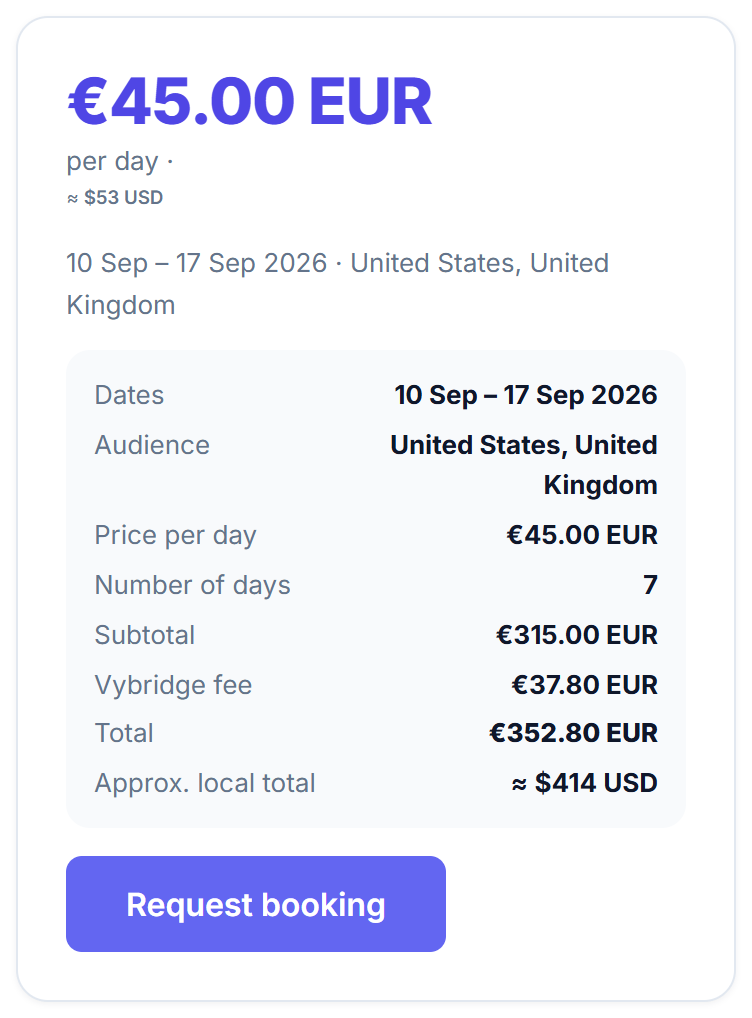
Fixed Price booking panel with EUR quote and fee breakdown.
Your Offer input on a listing booking panel.

Geography

Country targeting, explained simply

A website can have visitors from many countries. An advertiser may want only some of them.

Country targeting uses approximate IP-based geolocation. It helps match ads to visitor countries, but it is not a perfect passport check.

Illustrative visitor mix for a website:

If an advertiser books “United States only,” Vybridge aims to show that booking to visitors whose country lookup resolves to the United States. Worldwide bookings may serve visitors regardless of country.

Money display

EUR is the charge currency. Local amounts are estimates.

Marketplace transactions are charged in EUR. You can switch a display preference (USD, GBP, CZK, PLN, UAH, and more) to see an approximate conversion.
€100.00 EUR / day ≈ $117 USD
  • The second amount is only an estimate to help you understand the price.
  • The transaction is currently charged in EUR.
  • Your bank or card provider may use a different exchange rate.
  • If exchange rates are unavailable, Vybridge shows the EUR amount only.
Header display currency selector showing USD, EUR, GBP and other ISO codes.

What you are looking at: A display-currency selector in the header.

What to do here: Switch display preference for easier reading — checkout stays in EUR.

Payments

How money moves

Simple truth — without marketing fluff.

Advertiser pays

  • Pays advertising amount + Vybridge platform fee
  • Fee is on top — the publisher’s placement amount is not reduced by that fee
  • Current fee tiers by purchase size: 12% below €5,000 · 9% from €5,000 · 7% from €20,000
  • Processed by Stripe Checkout
  • Not escrow

Publisher receives

  • Must complete payout setup before inventory is bookable
  • Eligible payout after the placement has started correctly and payout requirements are met
  • Not automatic merely because dates ended
  • May be held for refund, dispute, compliance, or payout readiness

Bookings also respect a minimum advertising purchase floor. Very small purchases may be blocked even if a daily rate looks low.

Website referrals

Invite websites. Earn with Vybridge.

Know a website owner who could sell advertising on Vybridge? Any registered Vybridge user can invite them. When that website generates eligible paid bookings, you can earn referral rewards from Vybridge’s platform economics — not by reducing what the website owner earns.

You Invite a website Website joins Vybridge First eligible paid deal Referral reward

50%

of Vybridge’s platform fee

on the referred website’s first eligible paid deal

Not 50% of the advertising price. Not 50% of the publisher’s revenue.
Example (current 12% fee tier)
Website advertising price: €1,000
Vybridge platform fee (12%): €120
First-deal referral bonus (50% of that fee): €60
  • The referral relationship lasts 12 months from the referred publisher’s registration.
  • The first-deal 50% bonus happens once per eligible referred website.
  • On later eligible deals during the term, the current rule is 1% of eligible advertising GMV.
  • Self-referrals and abuse are not rewarded.
  • Rewards come from Vybridge’s platform economics — publisher revenue is not reduced.
  • Stripe may require identity and payout information before referral rewards can be paid. Vybridge does not collect bank credentials directly. Payout availability depends on Stripe verification and supported country. Tracked rewards are not the same as paid rewards, and referral payout execution is not yet enabled.
How referral rewards work (details)
  • One canonical website = one canonical referrer after attribution locks.
  • Deleting and re-registering a site does not reset referral history.
  • Rewards become payable only under Vybridge eligibility and settlement rules — not merely because someone signed up.
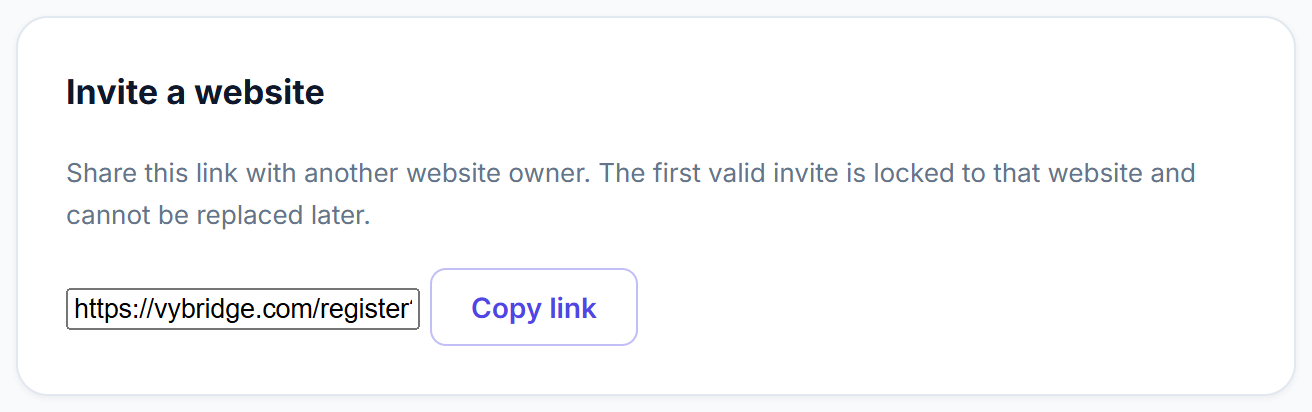
Referral invite link to share with website owners.

What you are looking at: Your personal referral invite link.

What to do here: Share the link with website owners you want to invite.

This program helps useful websites discover a new revenue channel — not multi-level marketing.

Good to know

Important limitations

Vybridge is honest about what it does and does not promise.

What Vybridge does not guarantee

  • Traffic, clicks, sales, or campaign results
  • Perfect country identification for every visitor
  • Automatic payout when a campaign ends
  • Escrow or holding advertiser money in a separate trust account

What to expect instead

  • Approximate GEO eligibility from IP lookup
  • Payment through Stripe; charge currency is EUR
  • Publisher payout only after valid serving began and rules are met
  • Pending offers do not reserve dates
  • Bookings must meet minimum purchase floors
  • Availability and price are re-checked before you finally submit

Why it exists

Why people use Vybridge

Advertisers

Skip manual outreach. Book with clear inventory and dates.

  • No emailing every website owner one by one
  • See real placements, dates, and geography options
  • Transparent booking workflow with Fixed Price or Your Offer
  • Country targeting where available

Website owners

Monetize unused space without negotiating every deal by hand.

  • Turn unused space into sellable inventory
  • Control placement and pricing mode
  • Manage offers and bookings in one place

Website referrers

Help websites discover a new revenue channel.

  • Invite website owners to Vybridge
  • Earn from eligible bookings on referred websites
  • First deal: 50% of Vybridge’s platform fee (once)

Vybridge does not guarantee revenue, traffic, clicks, or sales results.

FAQ

Practical questions

Do I need an account to browse?

No. You can browse the Marketplace and open listings without signing in.

Do I need an account to book?

Yes. Booking or submitting an offer requires a Vybridge account. You can configure dates, geography, and offer amount first; then create an account or log in to continue.

What currency does Vybridge use?

Marketplace transactions are charged in EUR. Publishers enter normal new prices in EUR.

Why do I see another currency below the price?

That is an approximate local display (for example ≈ USD) to help you understand the amount. Payment remains in EUR. Your bank may use a different rate.

What is “Your offer”?

It is a total amount you propose for the selected dates and geography. It is not a per-day price. The publisher accepts or rejects it.

Does making an offer reserve the dates?

No. Pending offers do not reserve inventory.

Can a publisher reject my offer?

Yes. Acceptance is the publisher’s decision.

When does a website owner get paid?

Earnings become eligible for payout after the advertising placement has started correctly and the booking meets Vybridge payout requirements. It is not paid merely because the placement ended.

Does Vybridge guarantee clicks or sales?

No. Vybridge provides the marketplace workflow for website advertising. Results are not guaranteed.

How does country targeting work?

You can choose worldwide or selected countries. Eligibility uses approximate IP-based country resolution. It is helpful, not perfect.

How do website referral rewards work?

Any registered Vybridge user can invite website owners. On the first eligible paid deal from a referred website, you can receive 50% of Vybridge’s platform fee. On later eligible deals during the 12-month term, the current rule is 1% of eligible advertising GMV. Rewards follow Vybridge eligibility and settlement rules. Referring an advertiser does not earn a reward.

What does the 50% referral bonus mean?

On the first eligible paid deal from a website you referred, you can receive 50% of Vybridge’s platform fee — not 50% of the advertising sale and not 50% of the publisher’s revenue.

Can I refer my own website?

No. Self-referrals are not rewarded.

What happens if a booking becomes unavailable?

Availability and pricing are rechecked through Vybridge’s booking path. Stale selections are not silently forced through if the listing, dates, or targeting are no longer valid.

Is Vybridge escrow?

No. Vybridge is a marketplace platform — payment is processed through Stripe Checkout. Vybridge does not hold advertiser money in a separate escrow or trust account.

What if I need help?

Contact support@vybridge.com. Also read the Terms of Service and Privacy Policy.

Ready to try it?

Browse real website placements, or list your site and create your first advertising space.